


TL;DR
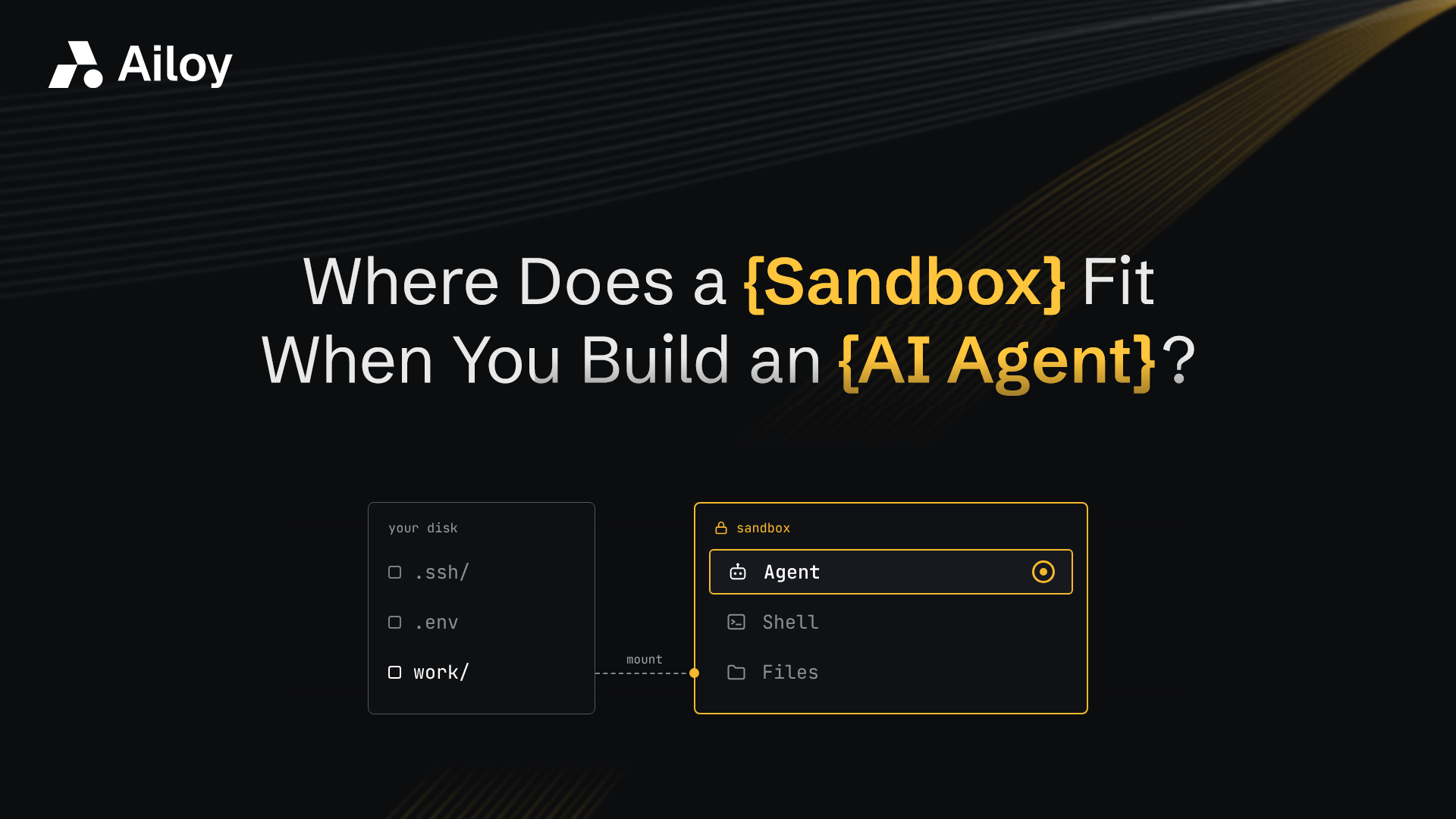
- An AI agent sandbox is an isolated environment, usually a container or a virtual machine, where an agent’s commands and code run, so a wrong or manipulated tool call can only reach what you put inside it. It is also the agent’s workspace, where it can install dependencies, create files and carry out multi-step tasks.
- Agents already misbehave in production. In a SailPoint survey of 353 IT professionals, 80% said their AI agents had taken unintended actions, and 39% reported agents accessing unauthorized systems or resources.
- The sandbox belongs around the tool layer, meaning the shell, file and code-execution tools. The agent loop, the model API key and your policy checks stay in the host process.
- The boundary technology decides which kernel the agent’s code talks to. Containers share the host kernel, gVisor puts a user-space kernel in between, and microVMs such as Firecracker give each sandbox its own guest kernel.
- Ailoy, from BrekkyLab, runs each agent’s tools in a Linux micro-VM. Shell and file tools run inside the VM, web tools run in the host process, and mounts and network access are set per console.
AI agents no longer only answer questions. Coding agents, data agents and browser agents run shell commands, edit files, install packages and execute code they wrote a moment earlier, on whatever machine they run on. Where those actions run matters as much as which model chooses them.
This guide starts with the basics: what an AI agent sandbox is, why agents need one and what goes wrong without one. It then covers where the sandbox sits in the agent loop, how containers, gVisor and microVMs compare, and five checks for what should cross the boundary.
What is an AI agent sandbox?
An AI agent sandbox is an isolated environment where an agent’s actions run, so the commands and code it produces can only reach what you put inside. It is usually a container or a virtual machine with its own filesystem, its own processes and controlled network access. You have probably used one already: when you upload a spreadsheet to ChatGPT and ask for a chart, the Python it writes runs in a sandboxed environment on OpenAI’s side, not on your laptop, and that environment is discarded after the session.
To see why that matters, look at how an agent works. An agent is a loop: the model reads the context and proposes a tool call, your code runs the tool, and the result goes back to the model. The model never touches your machine directly. Every side effect happens when your code executes a tool call, and a typical agent produces four kinds of them:
- Shell commands. Anything the model passes to
bash,shorpowershell. Example: a coding agent runninggit clone,ls -laornpm testto find its way around a repository. - File operations. Reads, writes and deletes inside a working directory. Example: an agent in Cursor renaming a function and rewriting the three files in
src/that call it. - Code execution. Scripts the model writes and then runs, including tests and notebooks. Example: ChatGPT’s data analysis feature writes a Python script to chart an uploaded CSV, then runs it.
- Package installs.
pip,npmandapt, which download and execute third-party code. Example: the agent hitsModuleNotFoundError: No module named 'pandas'and runspip install pandasto fix it.
These are the steps where model output turns into code that runs. A sandbox does not make the model behave better. It limits what a bad tool call can reach. A model that runs rm -rf inside a disposable VM costs you a VM, and the same command on your laptop costs you your laptop.
Why AI agents need a sandbox
Agents need a sandbox for two reasons: a place to do the work, and a limit on what that work can reach.
A workspace for multi-step work
An agent that only answers questions needs no machine. An agent that does the work needs somewhere to install dependencies, create files and run what it wrote. Take Ailoy’s CAD use case: given a prompt like “Design a planetary gear bearing with 5 planets”, the agent writes a CadQuery script, renders the model from four sides, looks at the renders and fixes the model until it matches the request, then hands back STEP, STL and GLB files. Each step depends on what the previous step left behind, and none of it touches your own machine’s setup.
A limit on what can go wrong
Ordinary software runs code that a developer wrote and reviewed. An agent runs commands nobody reviewed, chosen at run time by a model. That brings risks a normal application does not have:
- The model writes the commands. OWASP lists “LLM output is entered directly into a system shell or similar function such as exec or eval” as the first example of improper output handling, with remote code execution as the impact. An agent with a shell tool is built to do exactly that.
- The agent reads content you do not control. OWASP describes indirect prompt injection as what happens “when an LLM accepts input from external sources, such as websites or files”. A README, a web page or an issue comment can carry instructions nobody on your team wrote, and the agent may follow them with your permissions.
- The model makes mistakes without any attacker. Besides the SailPoint figures above, a Salt Security survey of more than 380 professionals found 49.8% of respondents confirmed or suspected unexpected or unauthorized AI agent activity in the past year. Both surveys are vendor-sponsored and self-reported, so read them as a signal of how common the problem is rather than as precise rates.
- Package installs run third-party code.
pip installandnpm installcan execute scripts that ship inside the package, with the permissions of whoever runs the install.
Why prompts and allowlists are not enough
A rule in the system prompt such as “never delete files” is text the model weighs against everything else it reads, including text an attacker planted. Command allowlists help, but they filter strings: a model allowed to run python or npm can still run arbitrary code through the allowed binary. OWASP traces excessive agency to “excessive functionality; excessive permissions; excessive autonomy”. A sandbox caps the first two at the operating-system level, and human approval for high-impact actions caps the third.
What happens when an agent runs without a sandbox
Without a sandbox, a tool call runs with your user account’s permissions. It can read your SSH keys and cloud credentials, see every environment variable, reach your internal network and delete anything you can delete. Recent incidents show what that looks like:
- Deleted files. In late November 2025, a developer reported that Google’s Antigravity agent, while clearing a project cache, ran a command that targeted the root of the D: drive and wiped it. The developer had Turbo mode on, which lets the agent run commands without asking, and the deleted files could not be recovered (The Register).
- Planted instructions. In July 2025, a tampered release of the Amazon Q Developer extension for VS Code (version 1.84.0) shipped with malicious code that press reports describe as a prompt telling the agent to delete local files and cloud resources. AWS says it failed to execute because of a syntax error.
- Agents turned into search tools. In August 2025, malicious versions of the Nx build package ran an install script that called Claude Code, Gemini CLI and Amazon Q with their permission checks turned off (
--dangerously-skip-permissions,--yolo,--trust-all-tools) and told them to search the home directory for keys,.envfiles and wallets (StepSecurity). The results were posted to a GitHub repository in the victim’s own account (Nx advisory).
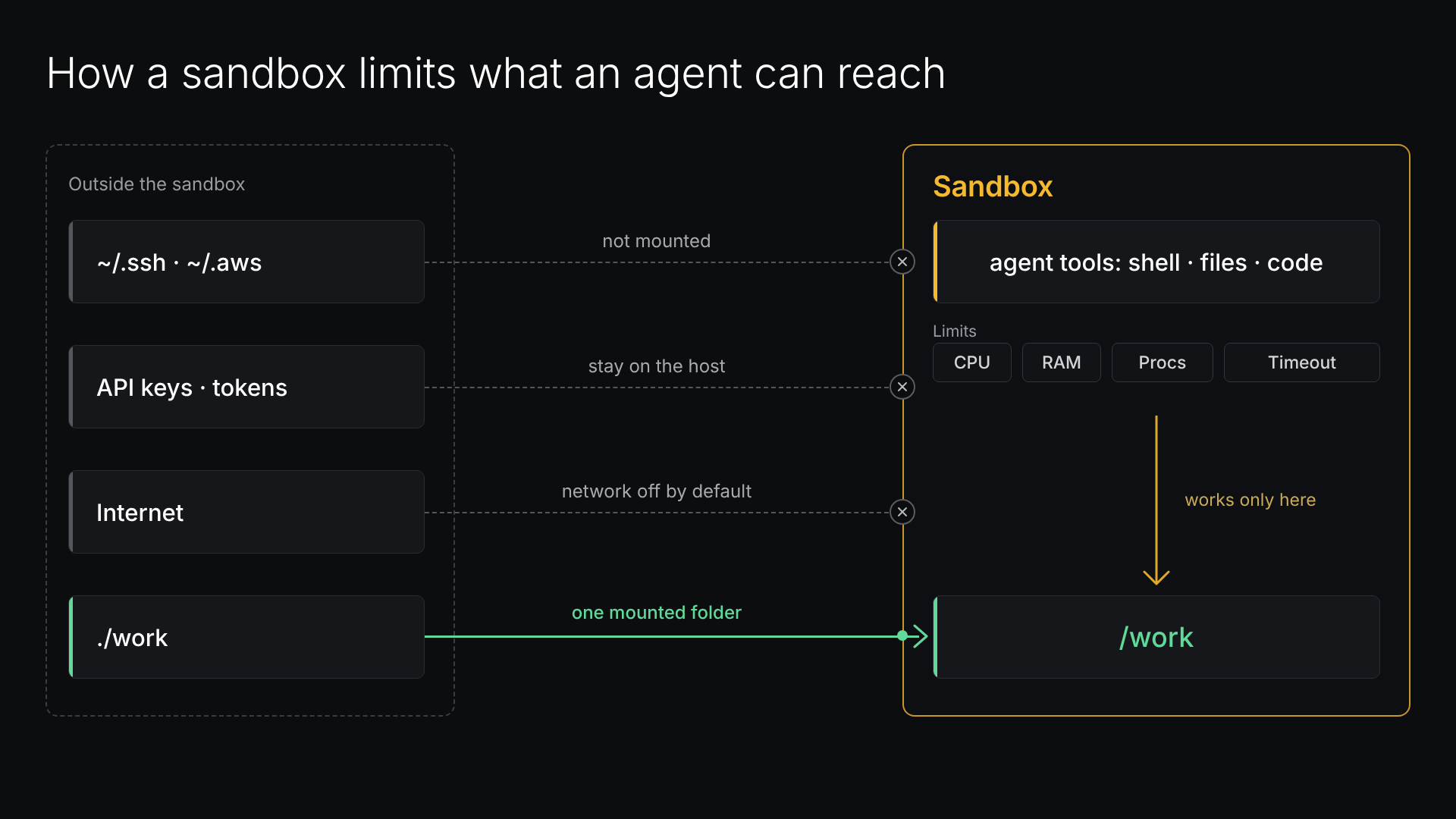
A sandbox would not have stopped any of these, but it would have confined each one to what was mounted inside it: a scratch folder instead of a whole drive or a home directory full of keys.
Where the sandbox sits in the agent loop
There are two common placements, and the choice decides what the sandbox protects.
Placement A, sandbox as a tool. The agent loop runs in your process and holds the model API key, the conversation and your policy checks. Only the tools that execute things run inside the sandbox. A prompt-injected command can damage the sandbox, but it cannot read the API key, because the key never enters the boundary.
Placement B, agent in the sandbox. The whole agent, loop and tools, runs inside one container or VM. It is easier to set up and suits coding agents in throwaway CI jobs. The cost is that the model credentials and everything else the loop needs sit inside the same boundary as the code the model writes.
For applications you build yourself, placement A is the stronger default. It follows Anthropic’s computer use guidance to “isolate Claude from sensitive data and actions to avoid risks related to prompt injection”.
Which tools go inside the sandbox and which stay out
Sort tools by what they do, not by how risky they feel:
- Inside the sandbox: shell, file read and write, code execution, package installs, and any browser that opens untrusted pages. Example: a coding agent such as OpenAI’s Codex runs a cloud task in its own container, where it clones the repo, runs
npm installand the test suite, so a maliciouspostinstallscript can only touch that container. A browser agent opening a vendor’s pricing page belongs here too, since the page can carry hidden instructions. - In the host process: calls to the model API, business functions that use real credentials (look up an order, send an email), and narrow, validated network tools. Example: a customer-support agent calls a
lookup_order(order_id)function that your backend runs with its own database credentials. The model sees the order status, never the connection string. - Behind human approval: anything irreversible that touches production, such as payments, deletions and outbound messages. OWASP’s Excessive Agency entry recommends requiring “a human to approve high-impact actions before they are taken”. Example: OpenAI’s ChatGPT agent asks the user for permission before consequential actions such as completing a purchase, and a refund agent should likewise draft a $4,800 vendor refund but wait for a finance lead to approve it before money moves.
Choosing the isolation boundary: containers, gVisor or microVMs
The real difference between sandbox technologies is which kernel the agent’s code talks to.
| Option | What the agent’s code talks to | Strength | Tradeoff |
|---|---|---|---|
| OS process sandbox (bubblewrap, Seatbelt) | The host kernel, with file and network rules | Cheap, no image to build | Coverage depends on the tool. Claude Code’s sandbox covers shell commands only |
| Container (Docker, runc) | The host kernel, through namespaces, capabilities and seccomp | Familiar tooling, fast | Docker warns the default capabilities and mounts “may provide incomplete isolation” |
| gVisor | A user-space application kernel written in Go | Syscalls do not pass straight to the host kernel | Higher per-syscall overhead, and not every syscall is implemented |
| Kata Containers | A dedicated guest kernel in a lightweight VM | Container workflow with a VM boundary | Needs a hypervisor. Kata supports QEMU, Cloud Hypervisor and Firecracker |
| Firecracker microVM | A dedicated guest kernel on KVM, minimal device model | Strong isolation at small overhead | Needs KVM. Published numbers hold under specific test conditions |
Containers
Containers isolate with namespaces, dropped capabilities and a seccomp profile that “disables around 44 system calls out of 300+”, but the remaining syscalls still reach the host kernel. Docker’s security page says the default capabilities and mounts “may provide incomplete isolation, either independently, or when used in combination with kernel vulnerabilities”.
gVisor
gVisor inserts “an application kernel that implements a Linux-like interface,” and its Sentry “does not pass system calls through to the host kernel.” The cost is “higher per-system call overhead” and possibly “poor performance for system call heavy workloads”. Package installs and builds are exactly that kind of workload.
MicroVMs
MicroVMs give each sandbox its own guest kernel. Firecracker advertises boot in under 125 ms and under 5 MiB of memory overhead per microVM. Its specification adds the conditions: boot is measured “with serial console disabled and a minimal kernel and root file system,” and the memory figure is for a microVM with one vCPU and 128 MiB of RAM. E2B runs “one Firecracker microVM per sandbox” for agent code.
A practical rule: if the agent only runs code you wrote, a container is usually fine. If it runs code the model wrote after reading content you do not control, give it its own kernel.
Five checks for what crosses the sandbox boundary
The isolation technology sets the wall, and the configuration decides how many doors it has. Anthropic’s engineering team puts it plainly: “effective sandboxing requires both filesystem and network isolation”.
- Scoped mounts instead of the home directory. Mount one working directory, not your home folder. Claude Code’s documentation is a useful warning: by default its sandbox can read “most of the machine, including credential files such as ~/.ssh and ~/.aws/credentials”.
- Network off by default. Start with the network off and turn it on per task, such as when the agent has to install dependencies, ideally through a domain allowlist. OpenAI’s Codex ships this way: “By default, the agent runs with network access turned off”.
- No long-lived credentials inside the boundary. Never inject API keys or cloud credentials into the sandbox. If code inside must call a service, route the call through a host-side tool that holds the key and checks the request.
- Fail closed when the sandbox cannot start. Decide what happens when the sandbox runtime is missing. Claude Code runs commands unsandboxed in that case unless
sandbox.failIfUnavailableis set. For an unattended agent, failing closed is the safer default. - CPU, memory, process and time limits. Isolation stops a runaway loop from reaching the host. Only limits stop it from eating the machine, or your cloud bill, from inside the sandbox. Cap CPU, memory, disk, process count and wall-clock time.
How long should an agent’s sandbox live: per call, per session or persistent?
Lifetime is the last placement decision, and it trades safety against usefulness.
- Per call. A fresh sandbox for every tool call. This gives the cleanest isolation, but the agent loses installed packages and files between steps, which breaks most multi-step work. Example: a chat assistant that runs one Python snippet to convert a pasted CSV to JSON can use a fresh sandbox per request, because nothing from the previous answer is needed.
- Per session. One sandbox for one task or conversation, destroyed afterwards. State carries across steps, and any damage dies with the session. This is the right default for most agents. Example: an engineer asks an agent to fix a failing test. It clones the repo, installs dependencies, reruns the test and patches the code inside one sandbox, and that sandbox is deleted once the task is done.
- Persistent. A long-lived environment that keeps state across sessions. It suits agents that maintain a project over days, but it needs snapshots, resets and the same mount and network discipline, because injected changes persist too. Example: a coding agent that maintains one repository over a week keeps its cloned repo, virtualenv and build cache between sessions, and the environment is snapshotted nightly so a bad change can be rolled back to yesterday’s state.
Why does a sandboxed agent still leak data or break production?
Two patterns undo a sandbox no matter how strong the boundary is:
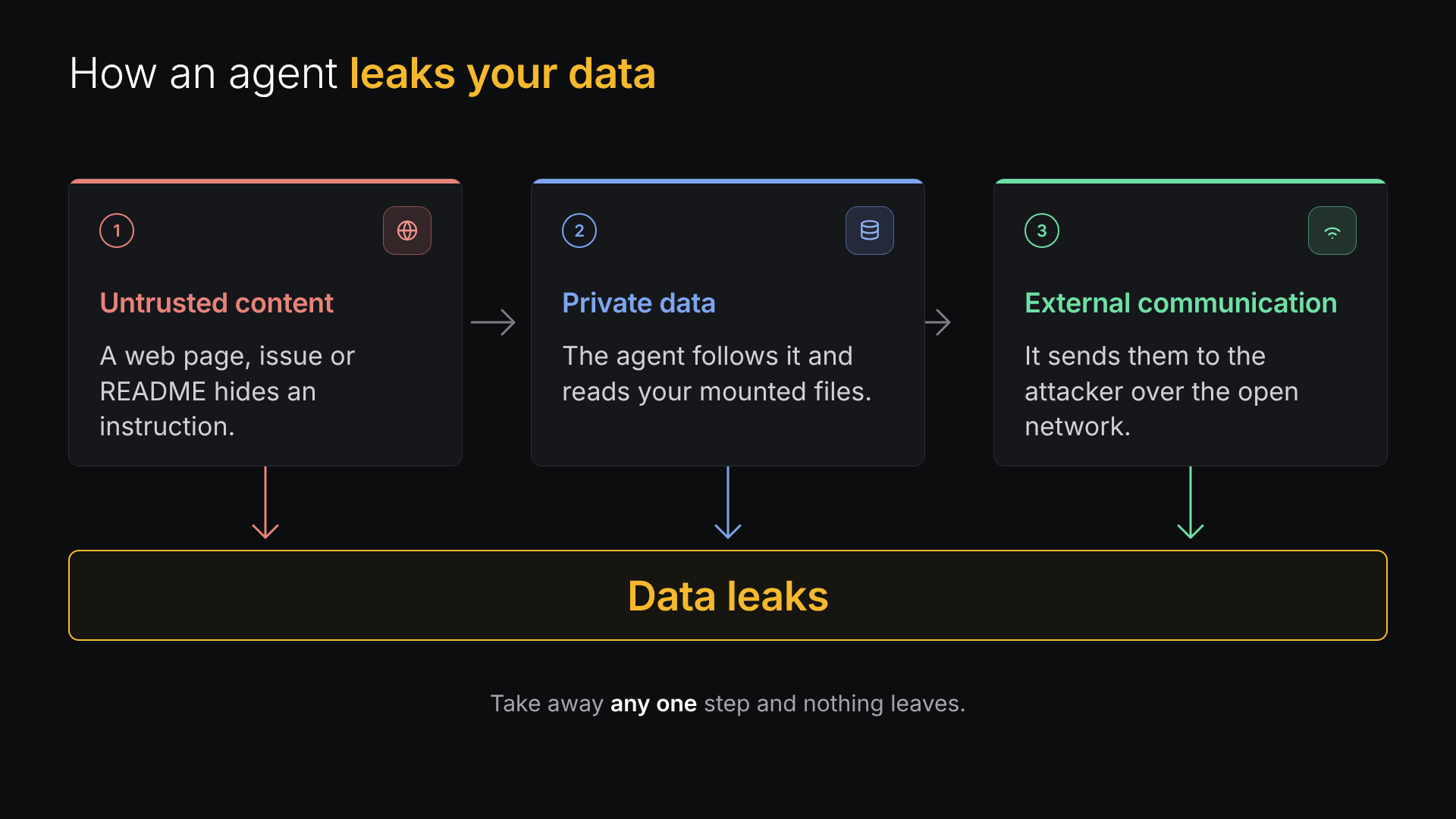
- Mounting private data next to an open network. Simon Willison’s “lethal trifecta” is access to private data, exposure to untrusted content and the ability to communicate externally. A sandbox holding all three still leaks. Take one leg away.
- Giving the agent legitimate production access. In July 2025, Replit’s agent deleted the production database of an app SaaStr founder Jason Lemkin was building, during a code and action freeze. Replit had used one database for preview, testing and production, and responded by rolling out automatic dev/prod separation. No kernel boundary would have helped.
How Ailoy places the sandbox
Ailoy is the open-source agent library from BrekkyLab for Python, Node.js and Rust. It uses placement A with a micro-VM. A ConsoleClient boots a Linux VM from an image recipe, and the agent’s built-in shell and file tools run inside it while the agent loop and the model key stay in your program. The example below is adapted from the Ailoy quick start and the sandbox guide. It builds the image first, so package installs happen outside the agent’s VM, then boots the VM with one mount and the network off:
import asyncio
from ailoy import AgentBuilderfrom virtx import ConsoleClient, ImageClient, ImageSource, Recipe, ensure_virtx

async def main() -> None:    await ensure_virtx()
    # Build the image once. pip runs here, not in the agent's VM.    async with await ImageClient.try_new() as images:        recipe = Recipe("python:3.12-slim-trixie").step("pip install matplotlib")        await images.build(recipe, "plot:latest")
    console = await (        ConsoleClient.builder()        .image(ImageSource.reference("plot:latest"))        .mount("./artifacts", "/artifacts")  # one scoped directory        .network(False)                      # no network inside the VM        .build()    )
    agent = await (        AgentBuilder("anthropic/claude-haiku-5-5")        .instruction("Write what you are asked for into /artifacts.")        .system_tools()  # shell and file tools run in the VM        .console(console)        .build()    )
    async for output in agent.run("Plot a sine wave and save it to /artifacts/sine.png."):        for part in output["message"]["contents"]:            if part["type"] == "text":                print(part["text"])

asyncio.run(main())
According to the Ailoy tools guide, the built-in shell and file tools (shell, read, write, edit and imgread for Anthropic models) run in the agent’s VM, while web_search and web_fetch run in your program’s process, and web_fetch refuses loopback, local-network and cloud-metadata addresses. The VM keeps its session between tool calls, so it also serves as the agent’s workspace: the packages it installs (with network access on) and the files it creates are still there at the next step. The console also takes .mount_readonly() for read-only inputs, plus CPU and memory settings.
Ailoy’s examples show what that workspace makes possible. The Offshore Leaks agent analyses the ICIJ database with SQL and Python it writes itself, the Laya agent routes a support inbox to departments using a decision model on the guest GPU, and the gameplay agent plays OpenTTD while you watch over VNC.
Conclusion
A sandbox belongs around the part of an agent that acts: the shell, the files and the code the model writes. There it gives the agent a workspace to install, build and run in, and it limits what that work can reach. Keep the loop, the secrets and the policy outside it. Choose the boundary by who wrote the code it will run, then configure it with scoped mounts, the network off and no credentials inside. Handle what no sandbox covers, such as production access and data exfiltration, with approvals and environment separation.
Run the five checks against the sandbox you have now before adding another layer. To give your own agent a VM of its own, start with the Ailoy quick start.
FAQs
Do I need a sandbox for every task?
Not necessarily. If you’re comfortable letting your agent freely access your local environment, including reading, creating, modifying, or deleting files, you may not need a sandbox. Otherwise, a sandbox is recommended to limit the impact of unintended actions.
Is Docker enough to sandbox an AI agent?
For code you wrote and trust, usually. For model-generated code that runs after reading external content, a container shares the host kernel, so a kernel exploit can cross the boundary. gVisor or a microVM closes that gap.
Does a sandbox stop prompt injection?
No. It limits what an injected instruction can do. Prevention still depends on keeping private data, untrusted content and outbound network access from meeting in one place.
Can an Ailoy agent reach the network or my files?
Only what you grant per console. .mount() exposes a host directory you choose at a path inside the VM, .mount_readonly() does the same without write access, and .network() turns network access on or off for that VM, so an agent that only needs to write output can run with one mounted folder and no network.
Can an Ailoy agent keep its files across chats?
Yes. Ailoy lets you snapshot a console at the end of a session and restore it at the start of the next, so the agent starts with the files it wrote and the packages it installed. Running processes don’t carry over. If you only need specific files to carry over, mount a host directory with .mount() instead and have the agent write them there, such as notes, intermediate results or working files. Every session that mounts the same directory sees them, and they stay on your machine where you can read them directly.
Doesn’t a cold start on every chat add too much overhead?
Each chat does start a new console, but the cost is small. Every console is a microVM, which is much lighter than a traditional VM and still gives the agent its own kernel. A microVM (Firecracker or libkrun) typically boots in about 100–200 ms, though the exact time depends on your host and base image. That’s negligible compared to the time an LLM takes to respond. To keep startup fast, build the image ahead of time so packages aren’t reinstalled on every boot.