


TL;DR
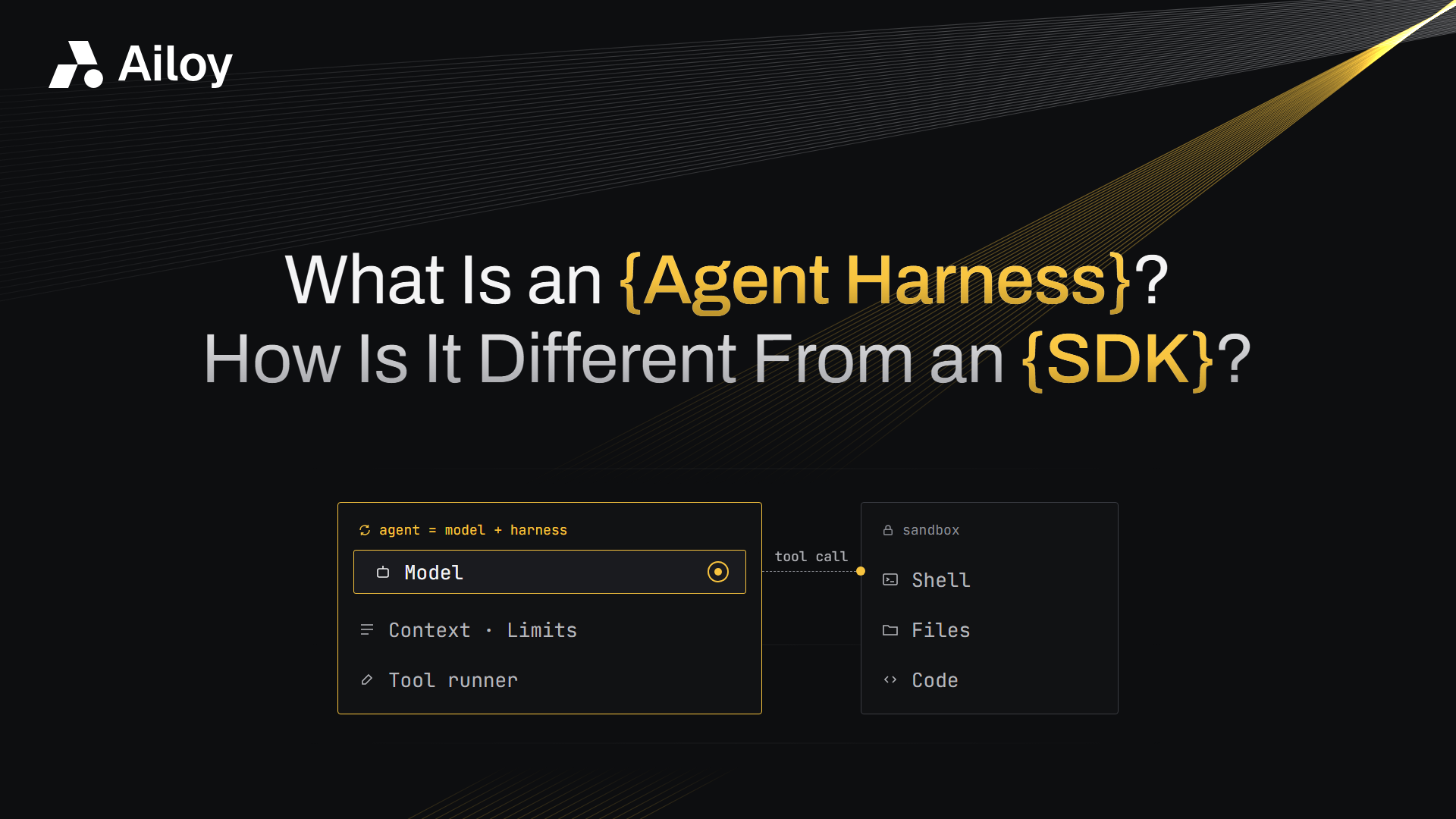
- An agent harness is the software around a model that runs its loop. It builds the context, runs the tool calls the model asks for, returns the results and decides when to stop. LangChain sums it up as Agent = Model + Harness.
- The harness changes results as much as the model does. LangChain moved its coding agent from outside the top 30 to the top 5 on Terminal Bench 2.0 by changing only the harness.
- Many agent failures are harness failures. Anthropic saw agents try to build a whole app in one go, run out of context halfway and then declare the job done. The fixes were a progress file, a feature list and browser testing, all in the harness.
- A harness is one layer among several. A framework gives you parts, a runtime keeps agents running, an SDK is the library you call, and a sandbox is where the harness’s tools run.
- Keep the harness outside the sandbox. Anthropic split them after finding that untrusted code ran in the same container as credentials. Ailoy keeps the loop and the keys in your program and gives every agent a Linux VM of its own to work in.
A model on its own can only write text. Ask it to fix a failing test and it can tell you which line to change, but something else has to open the file, run the test and show the model the error. That something is the agent harness.
You have used one if you have used Claude Code, Codex or Gemini CLI. Type “fix the failing test in checkout.test.ts” and the model never touches your disk. The harness reads the file for it, runs npm test for it and feeds the output back, again and again, until the test passes.
This guide starts with the basics: what a harness is, why an agent needs one and what goes wrong when it is weak. It then covers what good harnesses do differently, how a harness differs from an SDK, a framework, a runtime and a sandbox, and five questions to ask before you pick one.
What is an agent harness?
An agent harness is the code around a model that turns it into an agent. Nielsen Norman Group defines it as “the software around an AI model that runs its execution loop: it carries out the model’s requests to use tools, returns the results, and controls what information the model receives and what it is allowed to do.”
LangChain’s Vivek Trivedy puts it more broadly: “A harness is every piece of code, configuration, and execution logic that isn’t the model itself.” In that view, an agent has two parts, the model and the harness, and everything you build that is not the model belongs to the harness. Anthropic describes the SDK behind Claude Code as “a powerful, general-purpose agent harness”.
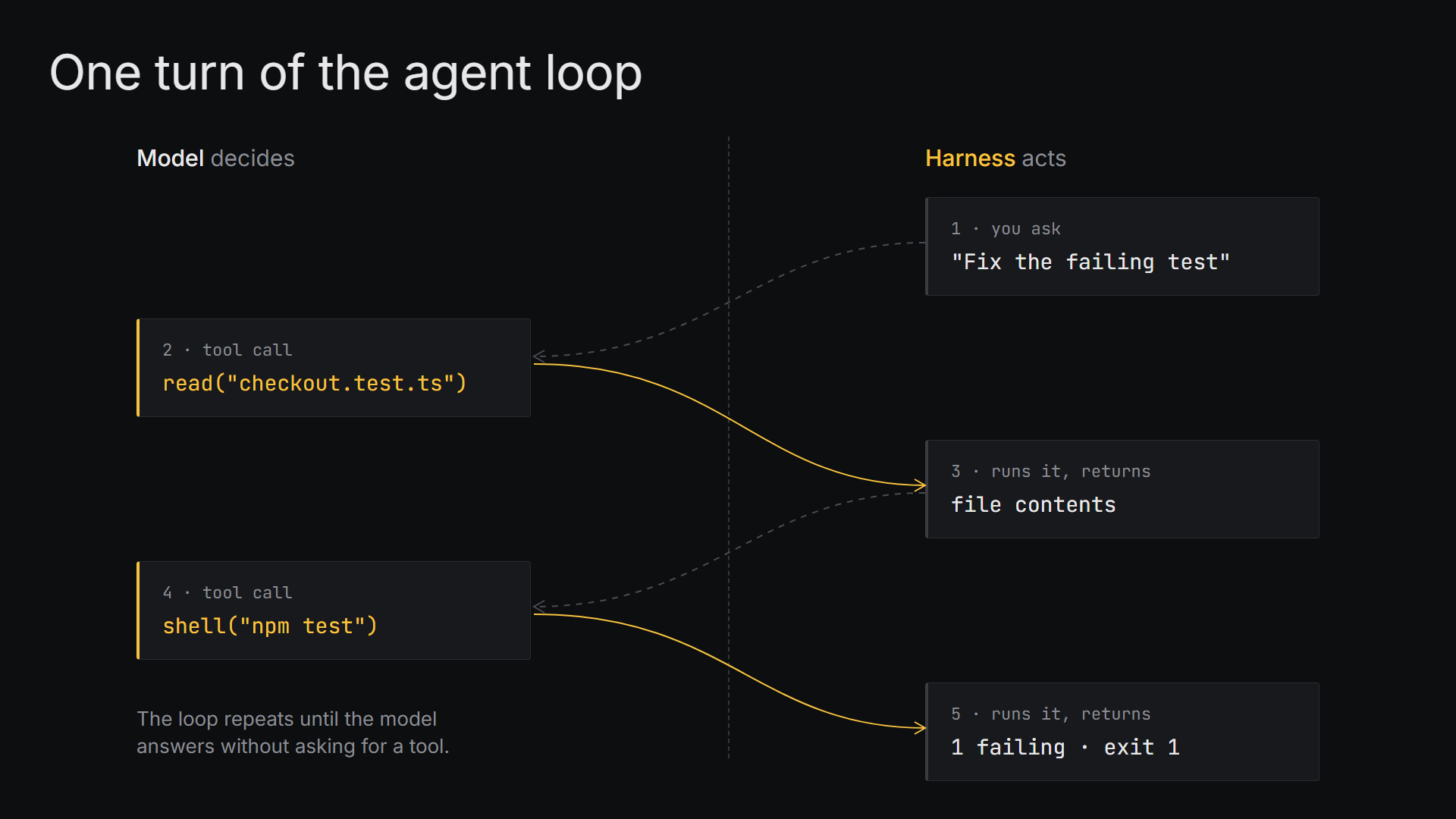
To see where the model stops and the harness starts, follow one request through a coding agent:
- You ask. “Fix the failing test in checkout.test.ts.” The harness adds a system prompt, the names of the files in the project and a description of each tool, then sends it all to the model.
- The model asks for a tool. It replies with a tool call such as
read("checkout.test.ts"). It has not read anything yet. It has only written a request. - The harness runs it. It checks the call is allowed, reads the file from disk and adds the contents to the conversation.
- The loop repeats. The model asks to run
npm test, the harness runs it and returns the failure, the model asks for an edit, the harness applies it and runs the test again. - The harness stops. When the model answers in plain text without asking for a tool, the harness ends the loop and shows you the answer.
The model made every decision in that list. The harness did every action.
Why do you need an agent harness?
You need a harness because a model cannot act, cannot remember past its context window and cannot check its own work. The harness covers all three.
A model can only write text
A language model takes text in and gives text out. It cannot open a file, run a command or call an API. Tool calling only means the model writes a structured request, such as a function name and arguments. Example: when ChatGPT charts a spreadsheet you uploaded, the model writes the Python, and the system around it runs that Python and returns the chart.
The same model does better or worse depending on the harness
The harness decides what the model sees and what it can do, so two agents on the same model can score far apart. LangChain reports that it moved its coding agent from outside the top 30 to the top 5 on Terminal Bench 2.0 “by only changing the harness”. It also notes that “Opus 4.6 in Claude Code scores far below Opus 4.6 in other harnesses” on that benchmark. Same model, different harness, different result.
A bigger context window does not replace a harness
It is tempting to think a large context window means the agent can just keep everything. LangChain describes “Context Rot”: models “become worse at reasoning and completing tasks as their context window fills up.” Example: an agent that has read 40 source files and 30 test logs is carrying all of that into every new request, even though it only needs the last error. Deciding what to keep is the harness’s job.
What does an agent harness do?
Every harness runs the loop above. Around that loop, it takes on six jobs:
- Building the context. It writes the system prompt, adds the conversation so far and describes each tool. Many harnesses also load a project file such as
AGENTS.mdat the start. Example: before the first call, a coding agent’s harness tells the model which repository it is in, which test command to use and which tools can read and edit files. - Running tools. It turns tool calls into real actions: shell commands, file edits, web requests, calls to your own functions or to MCP servers. Example: the model asks for
shell("npm test"), and the harness runs the command and returns the output, including the exit code. - Choosing tools that fit the model. Models are trained on particular tools, so a harness can give each model the tools it knows. Example: Codex edits files with patches, so a harness can give OpenAI models a patch tool and Anthropic models separate read, write and edit tools.
- Keeping the context in budget. Every tool result makes the next request bigger. A harness decides what to trim, summarise or move to a file when the history grows. Example: LangChain describes harnesses that write a long tool output to the filesystem and give the model a short pointer, so it can read the full output only if it needs it.
- Setting limits. It decides what the model may do without asking: which tools exist, which need approval, how long a command may run. Example: a harness lets the agent read any file in the project but asks you before it runs
git pushor deletes a folder. - Carrying work across sessions. A long task outlives one context window, so the harness leaves notes for the next session. Example: Anthropic’s harness for long-running coding agents writes “a claude-progress.txt file that keeps a log of what agents have done” and a first git commit, so each new session can pick up where the last one stopped.
What goes wrong when the harness is weak?
Many of the agent failures people post about trace back to a harness decision. Here are real cases:
- The agent tries to do everything at once. Anthropic asked Claude to build a clone of claude.ai over many sessions. With a basic harness, the agent “tended to try to do too much at once”, which led to “the model running out of context in the middle of its implementation”. The next session started with half-written features and no notes.
- The agent declares the job done too early. In the same project, “a later agent instance would look around, see that progress had been made, and declare the job done.” Nothing in the harness told it what “done” meant.
- The agent skips testing. Anthropic also saw “Claude’s tendency to mark a feature as complete without proper testing.” Unit tests passed, but the feature did not work when a person clicked through it.
In each case the model did what a model does. The harness decided how much work to attempt and what counted as finished.
What happens when the harness’s checks are switched off?
A second kind of failure starts with a harness that works as designed. Its approval checks are settings, so a user or another program can turn them off:
- A permission setting lets a command run unchecked. In late November 2025, a developer reported that Google’s Antigravity agent, while clearing a project cache, ran a command that targeted the root of the D: drive and wiped it (The Register). Turbo mode, a harness setting that lets the agent run commands without asking, was on.
- Someone else switches the harness’s checks off. In August 2025, malicious versions of the Nx build package called Claude Code, Gemini CLI and Amazon Q with their permission checks turned off, using
--dangerously-skip-permissions,--yoloand--trust-all-tools, and told them to search the home directory for keys and wallets (StepSecurity). The checks lived in the harness, and a flag removed them.
In both cases the harness did what it was set to do. A check that a setting or a flag can switch off is only as safe as that setting, so keep a second limit the agent cannot touch: a sandbox that sees only what the task needs.
How do teams build a better harness?
The fixes for the weak-harness failures are harness changes too. These are the ones Anthropic and LangChain describe, with how each works in practice:
- A feature list the agent cannot rewrite. Anthropic’s initializer agent writes a JSON file of “over 200 features” for the claude.ai clone, all marked as failing at the start. Later sessions may only flip a feature’s
passesfield. Example: a session picks “user can rename a chat”, builds it, tests it and marks only that one as passing. - A fixed start to every session. Each coding session runs
pwd, reads the git log and the progress file, then picks “the highest-priority feature that’s not yet done”. Example: a session that starts on Tuesday reads that Monday’s session finished the sidebar and left the settings page half built, and starts there. - Testing the way a person would. Anthropic gave the agent browser automation through the Puppeteer MCP server and told it to “do all testing as a human user would”. Example: the agent opens the app, types a message, clicks send and checks a reply appears before it marks the feature done.
- Hooks that check the work. LangChain describes hooks that “run a pre-defined test suite and loop back to the model on failure with the error message”. Example: the model says the bug is fixed, the hook runs the tests, two fail, and the failures go straight back to the model instead of to you.
- Skills loaded only when needed. LangChain calls skills “a harness level primitive” that load by progressive disclosure. Example: an agent sees a one-line description of a “make a PDF report” skill, and the full instructions enter the context only when a task needs a PDF.
How is an agent harness different from an SDK, a framework, a runtime and a sandbox?
These words overlap, and even the people who coined them say so. LangChain’s Harrison Chase calls LangChain an agent framework, LangGraph an agent runtime and DeepAgents an agent harness, then adds: “I don’t think there is a clear definition of framework vs runtime vs harness.” Here is how the terms are most often used:
| Term | What it gives you | Example |
|---|---|---|
| Framework | Building blocks for an agent: model wrappers, tool definitions and a loop you assemble and configure | LangChain |
| Runtime | The layer that keeps agents running: state, persistence, retries and long-running execution | LangGraph |
| Harness | A working agent loop with the tools, prompts and context handling already chosen | Claude Code, DeepAgents |
| SDK | A library you call from your own code. An agent SDK often ships a harness inside it | Claude Agent SDK, OpenAI Agents SDK |
| Sandbox | An isolated place where the agent’s commands and code run, usually a container or a VM | Firecracker microVM, gVisor |
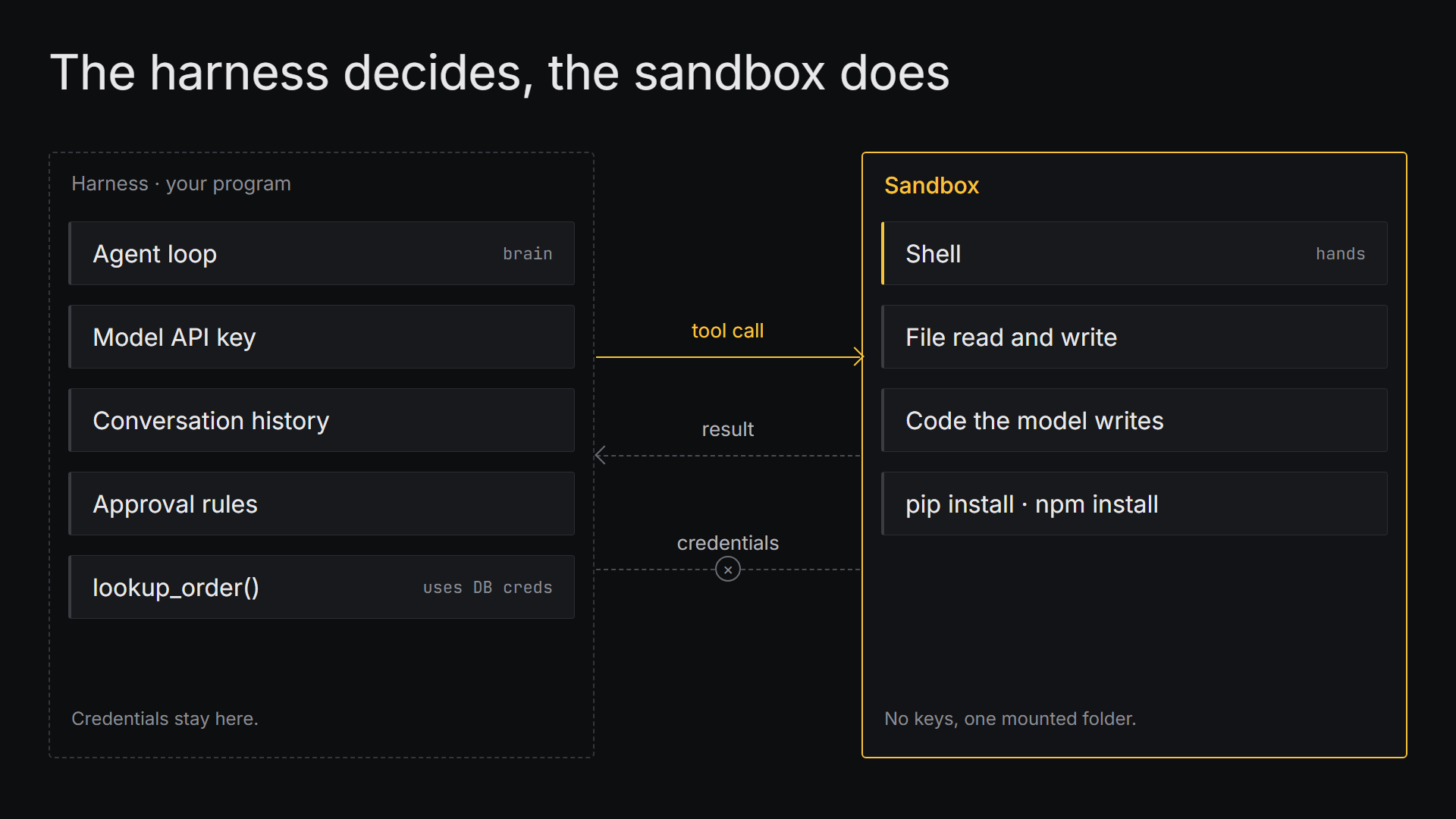
The useful line is between deciding and doing. The framework, runtime, SDK and harness all run the loop: what to send the model and what to do with its answer. The sandbox is where the actions happen. Anthropic draws the same line between “the ‘brain’ (Claude and its harness)” and “the ‘hands’ (sandboxes and tools that perform actions)”.
Example: in a support agent, the harness decides to look up order 4821 and calls your lookup_order function with your database credentials. When the same agent needs to turn a CSV of refunds into a chart, the harness sends that Python to the sandbox, which has no credentials at all.
Ailoy spans more than one row of that table. It is an agent SDK with a harness built in, and through virtx it gives every agent a Linux VM of its own as its sandbox. The harness stays in your program on the deciding side, and the VM is a whole computer on the doing side, where the agent installs software, runs code and keeps its files.
Should the harness run inside the sandbox?
No. Keep the harness outside the sandbox and only the tools that act inside it.
Anthropic learned this the hard way. In an early version of its managed agents, the harness and the sandbox shared one container, which meant “any untrusted code that Claude generated was run in the same container as credentials”. A prompt injection then only had to convince the model to read its own environment. The fix was to make sure “the tokens are never reachable from the sandbox where Claude’s generated code runs”.
The same split works for agents you build yourself:
- In the harness, outside the sandbox: the loop, the model API key, the conversation history, your approval rules and any function that uses real credentials. Example: a refund agent drafts a refund in the harness, which holds the payment API key and waits for a finance lead to approve it.
- In the sandbox: the shell, file tools, code the model writes and package installs. Example: the same agent runs
pip install pandasand a script that totals last month’s refunds inside a VM that only sees one exported CSV.
Our earlier post, Where Does a Sandbox Fit When You Build an AI Agent?, covers how to choose and configure the sandbox side.
What should you ask before you pick an agent harness?
- Which models does it run? Some harnesses are tied to one provider. Example: if you want to try the same agent on Claude and on an open model such as Qwen, check that the model is a setting you can change.
- Where do its tools run? Find out whether shell and file tools run on your machine, in a container or in a VM, and whether you choose the mounts and network access. Example: an agent that summarises your downloads folder should see that folder and nothing else.
- How does it handle long runs? Look for context management and a way to resume. Example: ask what happens to the output of the first 30 tool calls when the agent is on call 31.
- Can you see every step? You should get each tool call and result as it happens, so you can log it, show it in a UI or stop the run. Example: a support team wants to see which order the agent looked up before it replied to the customer.
- Can you add your own tools? Check for your own functions, MCP servers and skills, without forking the harness. Example: you want the agent to call your internal pricing API as a normal function.
How does Ailoy give an agent a computer of its own?
Ailoy is an open-source agent SDK from Brekkylab for Python, Node.js and Rust that gives every agent its own VM. Its AgentBuilder is the harness, and virtx, the VM layer Ailoy is built on, gives each agent a Linux microVM to use as its computer. Other stacks often pair a harness library with a hosted sandbox and glue code between them. Ailoy keeps both in one SDK, so there is nothing to wire together.
Here is what Ailoy gives an agent, according to the Ailoy and virtx docs:
- Swap models without rewriting the agent. The model is a string such as
anthropic/claude-haiku-5-5. Change it to move between Claude, GPT, Gemini or an open model such as Qwen. The harness is tuned for each model, so every model gets the toolset that suits it. One call routes a model through its API, Amazon Bedrock, OpenRouter or your own vLLM server (model providers, tools). - Tools run in a computer of the agent’s own.
ConsoleClient.builder()boots a Linux microVM on your own machine, with no Docker and no daemon to set up. The agent’s shell and file tools run inside it with no extra wiring. You choose the mounts and the network access, while the loop and the model credentials stay in your program. It is a full computer: boot any image from an OCI registry, install software, use the host’s GPU or serve a VNC desktop. Moving to a remote server changes one line (building a VM, virtx). - Long runs stay in budget. Turn on
context_manager()and, once the model’s input passes the limit you set, old tool results become[context truncated]while the latest three turns stay as they are. virtx can also keep what a VM installed or wrote in a snapshot, so the next one starts where the last one stopped (context manager, virtx). - Every step in plain view.
agent.runyields one complete message for each step of the tool loop. You can log each shell command, show it in your UI or check what the agent did before you show the final answer (quick start). - Your own tools plug straight in. Add Python and Node.js functions, MCP servers and skills in the Agent Skills format without forking anything, and give the agent a browser to drive with its
browser_*tools. Your internal pricing API becomes a normal function the agent can call (tools, MCP, skills, using a browser).
This example, adapted from the Ailoy quick start, builds an agent with a Python machine, one mounted folder and context management turned on:
import asyncio
from ailoy import AgentBuilderfrom virtx import ConsoleClient, Recipe, ensure_virtx

async def main() -> None:    await ensure_virtx()
    # The sandbox: a microVM with one mounted folder    console = await (        ConsoleClient.builder()        .image(Recipe("python:3.12-slim-trixie").step("pip install matplotlib"))        .mount("./artifacts", "/artifacts")        .network(True)        .build()    )
    # The harness: model, tools, context limits and the loop    agent = await (        AgentBuilder("anthropic/claude-haiku-5-5")        .instruction("Write what you are asked for into /artifacts.")        .system_tools()          # shell and file tools, run in the VM        .console(console)        .context_manager(max_input_tokens=50_000, preserve_recent_turns=2)        .build()    )
    async for output in agent.run("Create a bar chart of the populations of European countries and save it to /artifacts/population.png."):        for part in output["message"]["contents"]:            if part["type"] == "text":                print(part["text"])

asyncio.run(main())
The agent works inside the VM: the pip install, the chart script and every file it writes stay there, and only ./artifacts is shared with your machine. The model key and the loop stay in your program, out of the agent’s reach.
Conclusion
A model decides what to do next, and the harness does everything else: it builds the context, runs the tools, keeps the history in budget, sets the limits and carries work across sessions. Because the harness shapes what the model sees and what counts as done, the same model can do much better or much worse depending on it.
When you choose one, check which models it runs, where its tools run, how it handles long runs, whether you can see every step and whether you can add your own tools. Keep the harness and its credentials outside the sandbox, and let the agent do its work inside it. To give an agent a computer of its own, start with the Ailoy quick start.
FAQs
Is an agent harness the same as an agent framework?
They overlap. A framework gives you parts to assemble an agent from. A harness is a working agent loop with the tools and defaults already chosen, and it is often built on a framework. LangChain’s DeepAgents, for example, is a harness built on the LangChain framework.
Is Claude Code an agent harness?
Yes. Claude Code wraps Claude with a loop, tools and permission rules, and Anthropic calls the Claude Agent SDK behind it a general-purpose agent harness. Codex and Gemini CLI are harnesses in the same sense.
Does a better model make the harness less important?
No. LangChain’s Terminal Bench results show the same model scoring very differently in different harnesses. A stronger model still needs the harness to run its tools, trim its context and tell it what finished looks like.
Does an agent harness need a sandbox?
If the agent runs shell commands, edits files or runs code it wrote, yes. The harness decides what to run, and the sandbox limits what that can reach. Keep the harness and its credentials outside the sandbox.
Can I switch models in an Ailoy agent without rewriting it?
Yes. In Ailoy the model is a string in AgentBuilder, such as anthropic/claude-haiku-5-5, so you change that string to move between Claude, GPT, Gemini or an open model such as DeepSeek, Kimi, GLM or Qwen. Claude, GPT and Gemini run through their logged-in CLIs by default, and one call switches a model to its API, Amazon Bedrock, OpenRouter or your own vLLM server.
What runs inside an Ailoy agent’s VM?
Everything the agent does: its shell and file tools, the software it installs, the code it writes and the files it keeps. The loop and the model credentials stay in your program, out of the VM’s reach.