


TL;DR
- The Claude Agent SDK is Claude Code as a library. Anthropic describes it as “a library that runs the Claude Code binary”, with Claude Code’s tools, permissions, sessions and hooks, in Python and TypeScript.
- Teams look elsewhere for model choice, the sandbox, language or license. They want models other than Claude, they don’t want to build and host the sandbox around the SDK themselves, they need a language other than Python or TypeScript, or they want an open-source license instead of Anthropic’s Commercial Terms.
- Most alternatives open up model choice, but leave the sandbox to you. The OpenAI Agents SDK, Google ADK, LangChain’s Deep Agents and Pydantic AI all run models from more than one provider. For isolation, most connect to Docker, a Google Cloud project or a hosted sandbox account that you set up and pay for separately.
- Ailoy gives every agent a Linux VM of its own, with no Docker and no sandbox account. One call boots the VM on your machine, the agent installs and runs software inside it, and the loop and the keys stay in your program.
The Claude Agent SDK is the fastest way to put Claude Code’s agent inside your own app. You get the same loop, the same file and shell tools and the same context handling that Claude Code uses, and you call it from Python or TypeScript.
That speed comes with choices already made for you. The SDK runs Claude, it spawns a Claude Code process for every session, and it expects you to put that process inside a sandbox you build yourself. Most alternatives fix the first part and open up model choice, but they leave the sandbox to you. If you want the agent to have a computer of its own without building or renting one, the list gets much shorter.
This guide covers what the Claude Agent SDK does, why teams look for an alternative, four alternatives worth a look, and how they compare with Ailoy, which gives a model-agnostic agent a VM of its own. It ends with a working Ailoy example.
What is the Claude Agent SDK?
The Claude Agent SDK is Anthropic’s library for building agents on top of Claude Code. Anthropic says it “gives you the same tools, agent loop, and context management that power Claude Code, programmable in Python and TypeScript.”
What you get out of the box:
- Claude Code’s tools. Built-in tools to “read, write, edit files, run commands, and search the web”.
- Claude Code’s harness features. Hooks, subagents, MCP, permissions, sessions, skills and plugins, loaded “same as Claude Code” from your project’s
.claude/folder. - A Claude Code process per session. “The Agent SDK spawns and supervises a claude CLI subprocess that owns a shell, a working directory, and session files on disk.”
Example: you call query() with “find and fix the bug in auth.py”. The SDK starts a claude process, which reads the file, runs the tests in its shell and edits the code, while your app streams each message back to the user.
Our earlier post, What Is an Agent Harness?, explains where an SDK like this sits next to a framework, a runtime and a sandbox.
Why look for a Claude Agent SDK alternative?
The Claude Agent SDK is a good fit when you only run Claude and already host containers. Teams look elsewhere when one of these is true:
- You want to run models other than Claude. The SDK’s setup covers Anthropic’s API and three cloud providers, Amazon Bedrock, Google Cloud’s Agent Platform and Microsoft Foundry, and all of them serve it Claude. Example: you want to test whether an open model such as Qwen handles your support tickets as well as Claude at a lower cost, and the SDK has no setting for that.
- You have to build the sandbox around it. Anthropic’s hosting guide says to “run the SDK inside a sandboxed container for process isolation, resource limits, network control, and an ephemeral filesystem.” The whole SDK goes inside that boundary: “Claude Code (or your Agent SDK application) runs inside the isolation boundary (the sandbox, container, or VM).” Choosing a provider, keeping keys out of the container with a proxy and persisting state are left to you. Example: a data agent that runs pandas on customer exports needs a container, an egress proxy and a session store before it is safe to ship.
- Each session is a process to host. Anthropic is direct about it: “Hosting it is not like hosting a stateless API wrapper.” Its working files “live on the container’s filesystem by default” and are lost when the container restarts. Example: a hundred concurrent users means a hundred
claudesubprocesses, sized by RAM. - You need another language. The SDK ships for Python and TypeScript. For anything else, Anthropic suggests you “run the CLI as a subprocess with the -p flag and –output-format json.” Example: a Rust service would shell out to the CLI and parse JSON.
- You want an open-source license. “Use of the Claude Agent SDK is governed by Anthropic’s Commercial Terms of Service”, including when you build products for your own customers. Example: a team that ships an on-prem product may need a license it can review like any other open-source dependency.
What should a Claude Agent SDK alternative give you?
Use the same five questions from our harness guide, with one more for licensing:
- Which models does it run? Check that the model is a setting, so you can compare Claude, GPT, Gemini and open models on the same agent.
- Where do its tools run? Find out whether shell and file tools run in your process, in a container or in a VM, and who chooses the mounts and the network.
- What does the sandbox cost you? A hosted sandbox is one more account, one more bill and one more network hop. A local one is something you install and maintain.
- How does it handle long runs? Look for context management and a way to see every step as it happens.
- Can you add your own tools? Your own functions, MCP servers and skills, without forking the SDK.
- What is the license? Open source under MIT or Apache 2.0, or a vendor’s commercial terms.
Our earlier post, Where Does a Sandbox Fit When You Build an AI Agent?, goes deeper on question 2.
Which Claude Agent SDK alternatives are worth a look?
OpenAI Agents SDK
OpenAI’s agent SDK for Python and JavaScript/TypeScript. Despite the name, it is “provider-agnostic, supporting the OpenAI Responses and Chat Completions APIs, as well as 100+ other LLMs”, the others through “Any-LLM and LiteLLM as best-effort, beta adapter integrations.”
- Where tools run. Its sandbox agents are “preconfigured to work with a container to perform work over long time horizons.” The local client “runs commands as local host processes”, and on Linux “this backend adds no OS-level confinement”. For isolation you pick Docker or a hosted client such as Daytona, E2B, Modal, Vercel or Cloudflare.
- License. MIT.
- Pick it if your agents are mostly on OpenAI models and you build “multi-agent workflows”.
Google Agent Development Kit (ADK)
Google’s open-source framework for building, evaluating and deploying agents, in Python, TypeScript, Go and Java. “While optimized for Gemini, ADK is model-agnostic, deployment-agnostic, and compatible with other frameworks.”
- Where tools run. Code can run through Gemini’s built-in code execution, which needs Gemini 2 or later, or on Google Cloud: the GKE code executor uses “the GKE Sandbox environment with gVisor for workload isolation”, and the Agent Runtime tool “uses sandboxed environments for improved security.”
- License. Apache 2.0.
- Pick it if you deploy on Google Cloud and want evaluation built in.
LangChain Deep Agents
LangChain’s agent harness for Python and JavaScript. LangChain calls it “an open source agent harness” and “an opinionated agent that runs out of the box.” It “works with any LLM that supports tool calling: frontier, open-weight, or local”.
- Where tools run. “In Deep Agents, sandboxes are backends that define the environment where the agent operates.” Sandbox backends add an
executetool for shell commands, through providers such as LangSmith, Daytona, E2B, Modal, Runloop and Vercel. LangChain is clear about where safety lives: “Enforce boundaries at the tool/sandbox level, not by expecting the model to self-police.” - License. MIT.
- Pick it if you already build on LangChain and want its ecosystem of integrations.
Pydantic AI
A typed agent framework for Python, described as “the Python AI SDK: a typed, extensible agent loop with every model a string swap away.” It supports “virtually every model and provider”, from OpenAI and Anthropic to Bedrock, Groq and Ollama.
- Where tools run. Your tools run in your Python process. For model-written code there is a provider-run
CodeExecutionTooland “Monty, the sandboxed Python interpreter that runs model-written code.” Neither gives the agent a shell or a machine to install software on. - License. MIT.
- Pick it if your agent mostly calls your own typed functions and returns structured output.
How do the Claude Agent SDK alternatives compare?
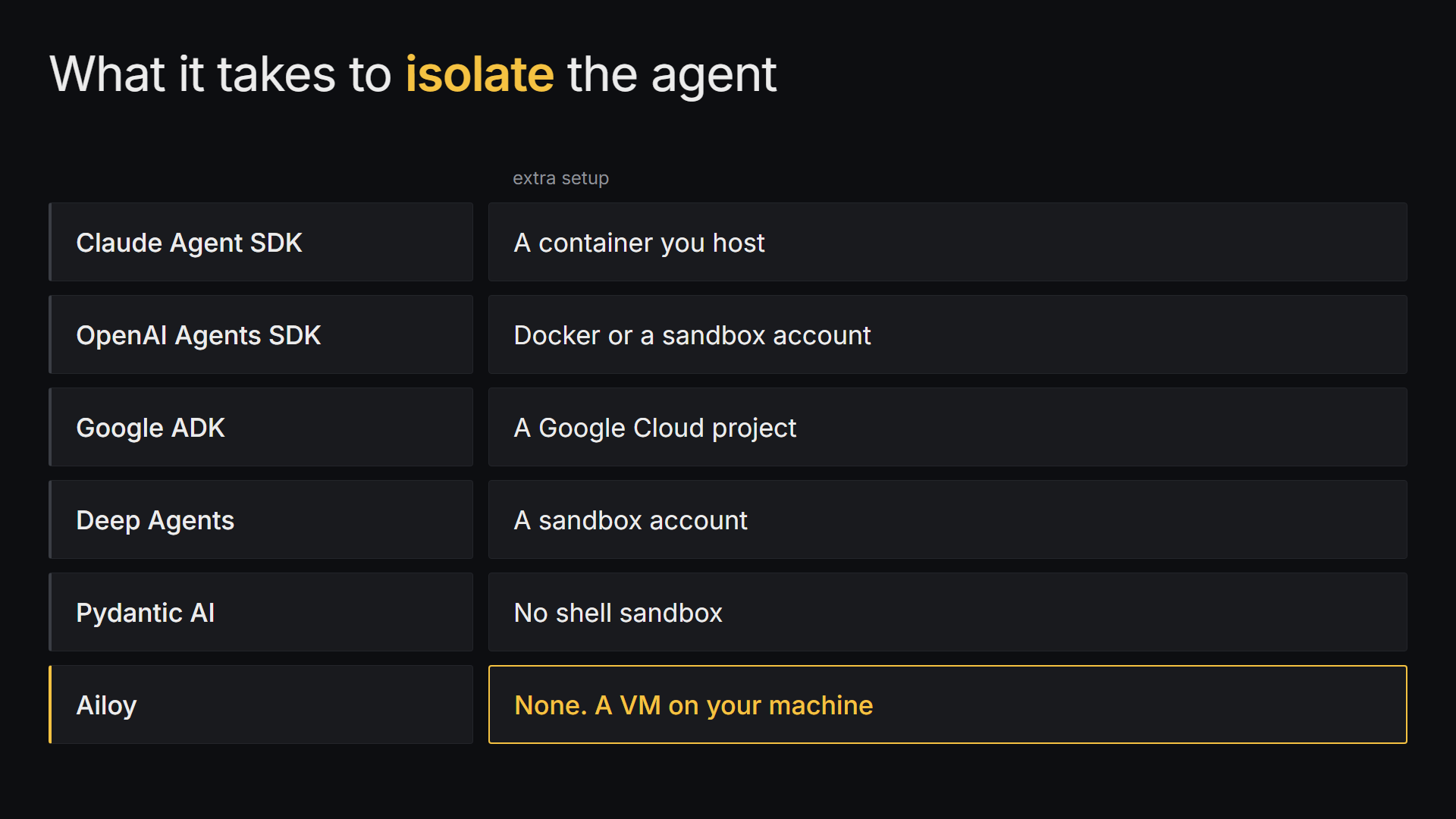
| SDK | Models | Where shell and code run by default | Isolation options | Languages | License | Extra setup for isolation |
|---|---|---|---|---|---|---|
| Claude Agent SDK | Claude (Anthropic API, Bedrock, Google Cloud, Foundry) | A claude subprocess on the host | Sandbox mode for Bash, or run the whole SDK in a container or VM you provide | Python, TypeScript | Anthropic Commercial Terms | A container or VM you build and host |
| OpenAI Agents SDK | OpenAI, plus 100+ through adapters | Local host processes | Docker or hosted sandbox clients (Daytona, E2B, Modal, Vercel, Cloudflare) | Python, TypeScript | MIT | Docker or a hosted sandbox account |
| Google ADK | Gemini first, others supported | Gemini's code execution or your process | GKE with gVisor, Google Cloud Agent Runtime | Python, TypeScript, Go, Java | Apache 2.0 | A Google Cloud project (GKE or Agent Runtime) |
| Deep Agents | Any model with tool calling | Your process (file backends) | Sandbox backends (LangSmith, Daytona, E2B, Modal, Runloop, Vercel) | Python, TypeScript | MIT | A hosted sandbox account |
| Pydantic AI | Most providers | Your process | Provider code execution, Monty interpreter | Python | MIT | None for Monty, but there is no shell sandbox |
| Ailoy | Any model by string (Claude, GPT, Gemini, open models) | A Linux microVM per agent, on your machine | virtx microVM, local or on a remote virtx server | Python, Node.js, Rust | Apache 2.0 | None |
Every other row follows the same pattern: the SDK runs the loop, and isolation is a separate piece you set up, whether that is a container you host, a cloud project you deploy to or a sandbox service you sign up for. Ailoy is the one row with no extra setup, because the VM comes with the SDK and boots on your machine.
How does Ailoy give a model-agnostic agent a VM of its own?
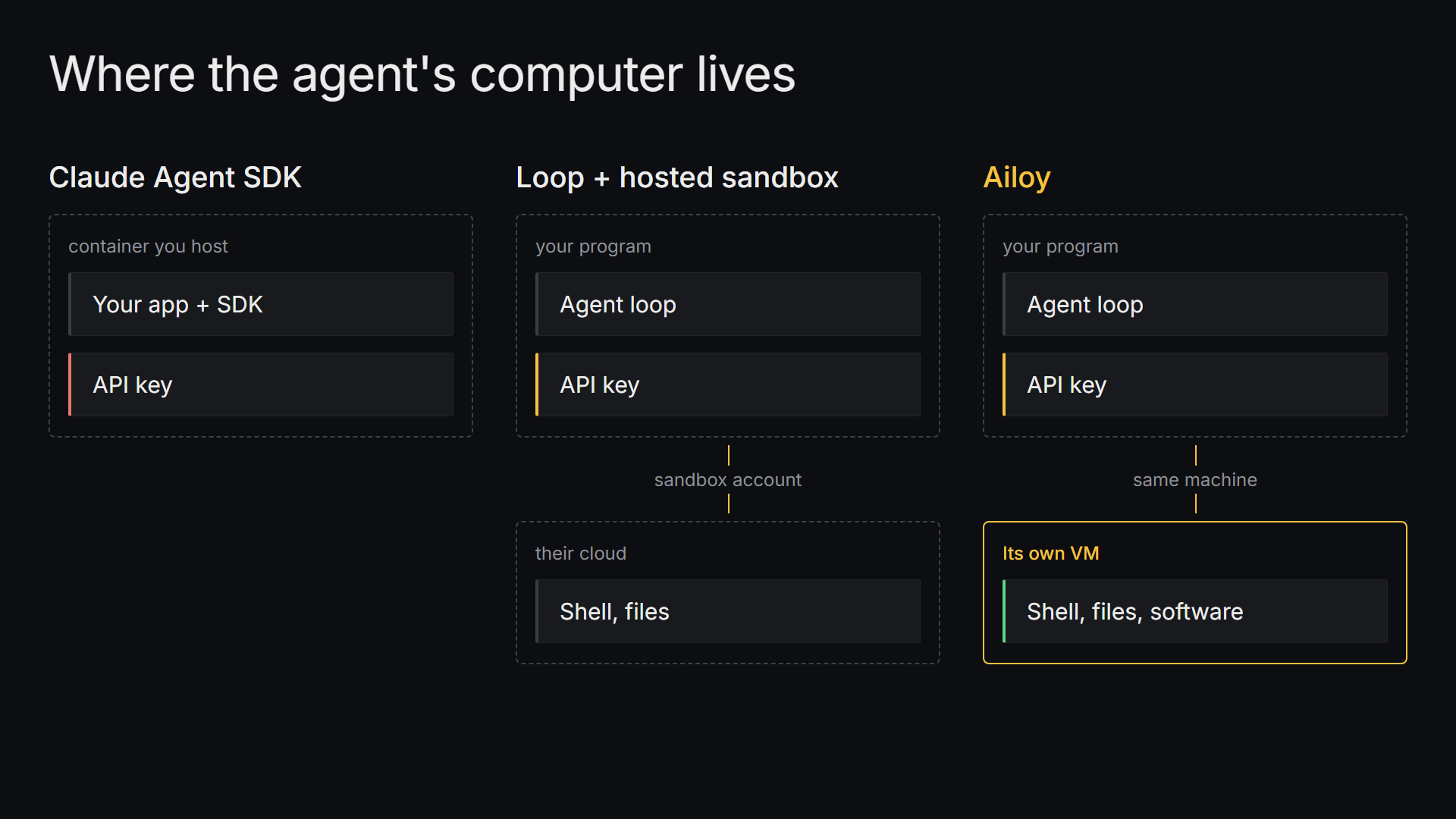
Ailoy is an open-source agent SDK from BrekkyLab that gives every agent a Linux VM of its own, on your own machine. There is no Docker to install and no sandbox account to sign up for: virtx, the VM layer Ailoy is built on, boots the VM, and AgentBuilder hands it to the agent. It ships for Python, Node.js and Rust, runs on Linux, Windows and macOS, and is licensed under Apache 2.0.
Here is what that gives you, according to the Ailoy and virtx docs:
- A full computer for every agent.
Client.spawn()starts a virtx server on your machine andcreate_sandboxboots a Linux microVM from any image, pulled from an OCI registry or built from a recipe. Hand it over with.sandbox(sandbox)and the agent’s shell and file tools run inside it with no extra wiring. The agent installs software, writes and runs code and keeps its files there, and it can use the host’s GPU through Vulkan or serve an app on a port you open (giving an agent a sandbox, virtx). - Local, with no vendor in between. The VM runs on your own machine, so there is no sandbox account, no sandbox bill and no network hop to a hosted service. When one machine is not enough, the same code can use a virtx server on another machine.
- The loop and the keys stay outside the VM. The agent loop and the model credentials stay in your program, out of the agent’s reach. You choose the volumes it sees, whether it has a network and which ports it opens.
- Any model, one string. The model is a setting such as
anthropic/claude-haiku-5-5. Change it to move between Claude, GPT, Gemini or an open model such as Qwen or EXAONE, and each model gets the toolset it was trained on (model providers, tools).
The rest is what you would expect from an agent SDK: opt-in context management, every step streamed as it completes, and your own functions, MCP servers, skills and browser tools (context manager, quick start, tools, MCP, skills, using a browser).
The smallest agent with a VM of its own takes about ten lines. This one, adapted from the quick start, boots a Python image on your machine and lets the agent install and run software there:
import asyncio
from ailoy import AgentBuilderfrom virtx import Client

async def main() -> None:    client = Client.spawn()  # a virtx server on your machine, no Docker    await client.pull_image("python:3.12-slim-trixie").complete()    sandbox = await client.create_sandbox("python:3.12-slim-trixie")    agent = await AgentBuilder("anthropic/claude-haiku-5-5").sandbox(sandbox).build()
    async for output in agent.run("Install cowsay with pip and make it say hello."):        for part in output["message"]["contents"]:            if part["type"] == "text":                print(part["text"])

asyncio.run(main())
Change the string to openai/gpt-6-luna and the same agent runs on GPT, in the same kind of VM.
For something closer to real work, this example, adapted from the sandbox guide, gives an agent a Python machine with pandas, one volume for its files and no network, and asks it to total a CSV of refunds by month. The model comes from the command line, so the same script runs on Claude or GPT:
import asyncioimport sysfrom pathlib import Path
from ailoy import AgentBuilderfrom virtx import Client, Recipe, SandboxVolume

async def main(model: str) -> None:    client = Client.spawn()
    # The agent's computer: an image with pandas, built once and kept on the virtx server    recipe = Recipe("python:3.12-slim-trixie").run("pip install --no-cache-dir pandas")    await client.build_image(recipe, "refunds:latest").complete()
    # One volume carries the CSV in and the result out    data = await client.create_volume("refunds-data")    await data.write_file("refunds.csv", Path("data/refunds.csv").read_bytes())
    sandbox = await client.create_sandbox(        "refunds:latest",        volumes=[SandboxVolume(volume=data.name, path="/data")],        network=False,    )
    # The model is one string; the rest of the agent stays the same    agent = await (        AgentBuilder(model)        .instruction("The files you work on are in /data. Save what you make there.")        .sandbox(sandbox)        .build()    )
    async for output in agent.run("Total the amount column of /data/refunds.csv by month and save it to /data/monthly.csv."):        for part in output["message"]["contents"]:            if part["type"] == "text":                print(part["text"])
    Path("data/monthly.csv").write_bytes(await data.read_file("monthly.csv"))    await agent.close()    await sandbox.remove()

asyncio.run(main(sys.argv[1] if len(sys.argv) > 1 else "anthropic/claude-haiku-5-5"))
Run it with python agent.py anthropic/claude-haiku-5-5, or python agent.py openai/gpt-6-luna to hand the same task to GPT. The agent works inside the VM: pandas, the script it writes and its scratch files stay there. It sees only the refunds-data volume, and your code copies monthly.csv back out when the run ends. The model key and the loop stay in your program, out of the agent’s reach.
Conclusion
The Claude Agent SDK gives you Claude Code’s agent as a library, and it is a strong choice if you run only Claude and already host containers. Look at an alternative when you want to compare models, need a language other than Python or TypeScript, want an open-source license or don’t want to build the sandbox yourself. That last reason is the one most alternatives leave open too, and it is the one Ailoy is built for.
The OpenAI Agents SDK, Google ADK, Deep Agents and Pydantic AI all open up the model choice, and each pairs its loop with a sandbox you choose and run separately. To keep the model a setting and give every agent a computer of its own on your machine, start with the Ailoy quick start.
FAQs
Is the Claude Agent SDK open source?
No. Its source is on GitHub, but use of the SDK is governed by Anthropic’s Commercial Terms of Service, including in products you build for your own customers.
Can the Claude Agent SDK run GPT or Gemini?
No. Its setup covers Anthropic’s API, Amazon Bedrock, Google Cloud’s Agent Platform and Microsoft Foundry, all serving Claude. For other models, use a model-agnostic SDK such as the OpenAI Agents SDK, Google ADK, Deep Agents, Pydantic AI or Ailoy.
Does the Claude Agent SDK come with a sandbox?
Partly. It has a sandbox mode that limits what Bash commands can reach, and Anthropic recommends running the whole SDK inside a sandboxed container or VM that you provide.
Which Claude Agent SDK alternative is closest to it?
Deep Agents, if you want the same kind of ready-made harness: an opinionated agent with file and shell tools that runs out of the box, with any model that supports tool calling. Ailoy, if you want that harness plus the sandbox the Claude Agent SDK leaves to you, since each agent gets a Linux VM of its own on your machine.
Can I keep using Claude with Ailoy?
Yes. Name the model as anthropic/claude-haiku-5-5 or any other Claude model. By default it runs through your logged-in Claude Code CLI, and one call moves it to Anthropic’s API, Amazon Bedrock or OpenRouter.
Does Ailoy need Docker or a cloud sandbox account?
No. Client.spawn() starts virtx’s server for you, and it boots each agent’s Linux microVM on your own machine with no Docker. On Windows, turn on the Windows Hypervisor Platform first.
How is Ailoy different from E2B or Daytona?
E2B and Daytona are sandbox services: in the usual setup you sign up, get an API key, and connect your own agent loop to sandboxes that run on their cloud. Ailoy is the agent SDK and the sandbox together. Its VM boots on your own machine through virtx with no account, and .sandbox(sandbox) hands it to the agent in one call.